Showing posts with label PBL. Show all posts

Wednesday, June 04, 2014

TEAM Research #18: Presentation

Tomorrow students will complete their presentation scripts and start practicing.  During our first TEAM Research lesson tomorrow, we'll feature one script presentation for the whole class to watch and critique.

As the brave first group presents, students and teachers will look for presentation strengths and room for growth.  We'll also notice how they match their background Google slide show to the presentation.

Together we'll identify the attributes of a successful presentation, a presentation that is both entertaining and informative.

After that every group will put the final touches on their scripts and start practicing. Teachers will move about the room critiquing their practice, and helping out.

Past Posts
Service Learning Sale #17

Sunday, June 01, 2014

TEAM Research #17: Service Learning Sale

Students created a marketplace to sell their wares, and raise money for endangered species' reserves.
Our TEAM Research project continues with this week's school assembly presentation and service
learning sales. Our school's principal, Mr. Lee, has fostered a tremendous service learning project approach in our school.  Service learning has transformed students in many ways.  In the old days you'd often see groups of children waiting for the principal for discipline, but now, at our school, most groups of students are waiting to see the principal to discuss, plan, and initiate a new service learning activity.  It's been an engaging, empowering effort in so many ways.

Some students will sell handmade clay figures. 
In March, a few students in my class hit a roadblock when it came to their service learning plans, and that's when we decided to move past the obstacle and include the whole class in the service learning project by matching it with our endangered species research.  Therefore, as part of the research project, research teams have been collecting and creating sale items and signage for this week's lunchtime sale.  Each group will set up a sale area, and sell their trinkets to raise money for the animal reservation they studied.

On Wednesday morning, students will finalize their signage, collection boxes, and sales techniques.  Then we'll head down to create the sale stations, and sell the goods at our class's homemade marketplace.  Once the sales are complete and the money collected, students will write letters and send the money to the reservations as one way to help protect endangered species (and practice math, reading, and writing skills :).  I'll be sure to take some pictures of this event as I imagine it will be a colorful, action-packed endeavor.


Project Learning Journey

Friday, May 30, 2014

TEAM Research #16: Less is More?

As we continue to navigate our TEAM Research project related to endangered species, I find myself analyzing each step of the project with respect to the learning and teaching goals.

I also find myself wondering about "less is more" with regard to this project and others.

"Less" provides greater opportunity to get it right and polish a project, yet "more" provides a greater number of learning avenues and potential repetitions that are child-friendly.  Again, like all things education, I believe a just-right balance for your teaching/learning goals and students' interests/needs is the way to go.

As I reflect on the revised project to date, I have the following thoughts:

Displays
  • What worked: lots of materials, showing models of past projects, time to explore and create, a child-friendly focus which honors their creativity, process ideas and steps, project meetings, a team approach.
  • What could be better: introduction to materials lesson including how to use the materials, put away materials, and share, and even more models of use and care.
Google Presentations
  • What worked: a guiding website, models, collaborative teams, guided research website.
  • What could be better: spending time at the start of the year and throughout the year learning how to use a guided website in multiple ways, even more practice with using online research tools and information to create multimedia compositions, still more attention to text features and formats.  Essentially, since this is a culminating project, the entire year's short projects and standards-base efforts could lead up to this in a focused, explicit way.
Film and Presentation Scripts and Delivery
  • What worked: Setting up a Google chart for shared script writing is a great way to foster share, writing, and voice, script writing and rehearsal provides authentic, engaging fluency practice in both reading and writing, and this is an engaging way to share information with classmates and others.
  • What could be better: More time and more models would help in this area as well as more explicit attention to the standards. Further, the addition of more, shorter and similar fluency projects throughout the year would really enhance this part of the project. 
Overall, so far, the addition of the collaborative aspect of this project as well as the scripts and greater presentation has enhanced this project so that it is a better fit for Common Core standards and student learning.  

Looking at a project like this as a capstone project, a culminating piece that synthesizes the year's learning, can provide the start to wonderful backwards design when it comes to a year's teaching and learning--teaching and learning that is focused on students' interests and needs as well as the standards and goals of the grade level. 

Thursday, May 29, 2014

TEAM Research #15: School Assembly

Students will give a presentation at school meeting. Their presentation will include a spoken introduction by six members of our class and a video noting endangered species project topics and the service learning sale.

The students worked tirelessly writing and rehearsing lines for the video as well as creating the images in Google draw.

So far the project highlights have included the following:
  • Focus on collaboration. (We've had many collaboration discussions)
  • Geography: I really liked connecting the research to a specific animal reservation.
  • Display creation and design.
  • Guided research.
The challenge as always is time--with projects like these you could go on forever, and because of that you choose "good enough" stopping spots.


Wednesday, May 28, 2014

TEAM Research #14: Wonderful WeVideo

As our TEAM Research project nears its final chapter, it's time to make our WeVideo film. At first each team was going to make their own film, but now we're going to make one collective film. The object of our film is to introduce the animal reservations, animals, and each service learning sale as part of our endangered species study.

So at first each group will write and complete a short script for filming.  The script will basically relay a message like this:

"We studied the _______________________ in ____________________, a reservation that saves the ________________________. You can help by buying ____________________________ at our Wednesday and Thursday Sale.
Where in the world is the reservation and animals you studied?

I'll encourage teams to write the text in a clever way and then act it out with enthusiasm in front of their display.

I'll also ask each team to craft three slides using Google draw:
  • One slide will show and name the reservation with a map showing and naming where in the world the reservation is.
  • The next slide will show and name the animals studied, and 
  • The final slide will show their sale items. 
The students can easily share their slides with me on Google.

I'll put the entire film together on my WeVideo account.

A small group of students will write a script and introduce the film at our school assembly.

This will be a fun project for a cool, wet morning of school.

Thursday, May 22, 2014

TEAM Research #13: Workshop

Teaching is not a straight path.  There are multiple revisions as change is a constant.

My students are embedded into their endangered species projects creating Google presentation, scripts, WeVideos, Scratch Games, displays and more.

Today we had the wonderful chance to visit our neighbor class and view their fantastic projects. My colleague, Ms. Cherwinski, facilitated a multi-modal endangered species review including lego sculpture, posters, SCRATCH games, Google slide shows, movies, hands-on maker stations (origami whales and Sculpty pandas), and movies.  One highlight was a young boy's mountain gorilla rap.  I also really liked the way another student added students' faces to images of the animals they were studying. Creativity was everywhere, and that creativity inspired my students.

Tomorrow we'll complete scripts and slide shows then work on displays and Wevideos.  This is the fun part of the project--the "everyone is involved" part where the most important research and presentation takes place. Onward.

Tuesday, May 20, 2014

TEAM Research #11: Serve the Students

In days of old, the teacher led most learning from the front of the room. Research shows that this "sage on the stage" role plays only one part of a balanced, blended learning program.  Research today also demonstrates the strength of student-to-student collaboration, conversation, and creativity.  So as this project evolves in the next few days, I'll mostly serve the students by answering questions, proving resources, directing and redirecting, leading focus lessons on specific research topics, and cheerleading them on towards great work with our project outline.

Day
Tasks (note: sadly the play will be postponed until after the ES project)
Ongoing
  1. Research, Write
  2. Create Objects for Display

Project Display Ideas
Weeks of 5/19
& 5/26

  • Google Presentations
  • Wevideos
  • Scripts
  • Props and Practice
  • Displays
  • Service Learning Items and Signage
  • School Assembly Presentation Practice and Script
  • Franklin Park Zoo trip research
Video Steps:
  • Make about 5-Google Draw slides with images and words. Download.
  • Open WeVideo, Create New Project
  • Upload Media (slides)
  • Create Text Slides and Recordings-note that you have choices on the recording by choosing from the template choices
  • Add Music
  • Edit
  • Show Teacher
  • Make Corrections
  • Show Teacher Again
Skype 5/23 w/Lemur Expert
Practice School Meeting Presentation Friday 5/30 - send Ms. Crozier links.
Week of June 2
  1. School Meeting Presentation
  2. Service Learning Sales: June 4 and 5.
  3. Project Presentation Practice
Week of June 9
  1. Practice
  2. Presentation June 11 from 9-11
  3. Presentation in other classrooms.
  4. Project Reflection, Add to ePortfolio.

TEAM Research #10: Writing Scripts

Students are motivated to write their endangered species presentation scripts.  The first group got up today, and practiced. Their script was an engaging story about four animals on an adventure.  They wove in the facts from the project.  It was much more interesting than the presentations of old days.

So we spent a little time talking about and writing TEAM scripts using this script guide packet. 

Article
Script Writing

TEAM Research #9: Messiness

"Learning and teaching is messy stuff. It doesn't fit into bubbles. I don't think a simple pencil-and-paper test is going to capture what students know and can do." 
-Michele Forman, Teacher of the Year 2001

We're at a messy spot with regard to TEAM research as teams are all at different places with their work.  This is where the teacher as coach is very important.  Yesterday, by the end of the day, it was clear we needed a meeting to set some new parameters with regard to our displays, collaboration, and research efforts

Hence, we'll spend some time after lunch meeting to discuss students' needs and expectations. We'll think about transitions and details such as where to stack your chairs at the end of the day with our new configuration, how to design our spaces including a peek at our neighboring class's wonderful displays, and the kinds of behaviors that support each other's work rather than take away from it.

I want to take some pictures today too so I can chart the class's efforts. The TEAM Research journey continues.


Note:
Interesting Study on Messiness
Embracing Messy Learning

TEAM Research Posts
TEAM Research Project Scope and Sequence
Set the Stage: Room Revision #1
Research Template #2
Substance #3
Just Right Challenge #4
First Edit #5
Revision #6
Coaching #7
WeVideo #8

Thursday, May 15, 2014

TEAM Research #8: WeVideo Introdution

Students will use WeVideo to introduce their projects.  They'll create a one-minute teaser that includes the following steps and information.  As with most projects, I'm sure that students will take this initial introduction and make it much better than my simple start.

WeVideo is currently free for a less than terrific copy.  I purchased a membership for myself to play with it more, and hope to use PTO money to purchase a subscription for the class next year since like all the Google related tools, I think this tool has lots of promise.


Video Steps and Example:

  1. Make about 5-Google Draw slides with images and words. Download.
  2. Open WeVideo, Create New Project
  3. Upload Media (slides)
  4. Create Text Slides and Recordings--note that you have choices on the recording by choosing from the template choices
  5. Add Music
  6. Edit
  7. Show Teacher
  8. Make Corrections
  9. Show Teacher Again
  10. Publish on Class Show Site for School Assembly Presentation.

The Science of Making Videos

Project Learning Journey

TEAM Research: Coaching #7

How do we coach students' project work so that everyone meets the project requirements and learns a lot.

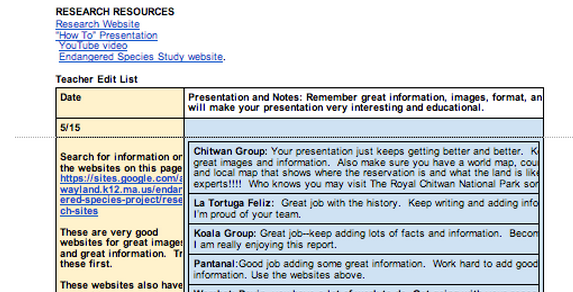
First, a class online schedule and coaching chart helps.  Teachers and students can access the charts online to identify the project steps, actions, and next-step feedback.  The class document allows all students and educators to stay abreast of the project from multiple view points.

Next, the use of collaborative tools such as Google Presentation allows teachers and students to have an ongoing dialogue with sound or text inside or next to the document. That's more personalized feedback than the class project document.

Finally, the important use of small group or one-to-one real time coaching and edits that encourage students along the project path by providing first hand comments, feedback, questions, and answers leads students forward.

Project BaseLearning (PBL) is no longer meeting a set of criteria and then getting a grade, instead it's an ongoing step-by-step process guided by criteria and coaching until every student and/or team has achieved their best possible work.

After that there's time for reflection and next-step planning as children continue their learning journey.

Research Journey Posts

TEAM Research Project Scope and Sequence
Set the Stage: Room Revision #1
Research Template #2
Substance #3
Just Right Challenge #4
First Edit #5
Revision #6

TEAM Research: Revision #6

As I looked over students' most recent research work, I realized that we have to push the presentation date out.  The information and project work is terrific demonstrating that the parameters of this project are positive--children are stretching and reaching as they research to find facts, photos, and maps.  And as I hoped, matching this research with a specific animal reservation or conservation area has prompted students to go on a virtual world tour looking at land maps, local landforms, animal habitats, reservation videos, and more.  The project is awakening them to worlds and work they didn't know about before.

Reluctantly, but purposefully, I pushed the project presentation date out by two weeks.  I don't want to rush this good learning. I want children to have more time to find the best facts, write good text, identify best images, design enticing film introductions, write engaging scripts, collaborate, and present with terrific voice, expression, and imagination.

Meeting the new criteria outlined in the MBAE report and other recent reports about dynamic learning takes time, intent, and revision--new learning is not a smooth road, but instead a twisty path as we reach for the project vision and strength. This is the kind of learning and work they will do in their future, and this is a good time to start their vigorous learning journey--a journey they'll continue throughout their life

------------------------------------------------------------------------------------------------

As I think more about this project, I realize that this project and all new learning has implications for the work we do:

  • Implications for behavioral expectations and consequences.
  • Implications for classroom design
  • Implications for teacher time and schedules.
  • Implications for home-school connections.
  • Implications for current scope and sequences.
  • Implications for feedback and grading, coaching and response.

New learning requires change in the way we have always done things in school, and this change creates disruption.

----------------------------------------------------------------------------------------------


Research Journey Posts
TEAM Research Project Scope and Sequence
Set the Stage: Room Revision #1
Research Template #2
Substance #3
Just Right Challenge #4
First Edit #5

Tuesday, May 13, 2014

TEAM Research: First Edit #5

I just gave students' research presentations a first edit, and as expected there was a range of response from students who are nearing completion to those who have just started adding facts.  We've truly only worked on this for a couple of days, so I expected to get a variety of responses.

I created a coaching document which lists the group names and the edit priorities, and I added notes and questions to the presentation canvas (Google Presentation).

In light of their work, I created a new timeline for the project.  We're squishing it in a bit which is mostly due to the fact that the fourth grade standards and scope and sequence takes more than teaching year's time, and the fact that I have high standards for the project.  I'm not settling for a simple research project, but instead one with more depth.

The depth truly made the edits more interesting and the projects more accessible than a simple report of animal facts.

I continue to chart this project in detail so I can give it a thorough assessment once its complete so that I can grow and improve it for the year to come.


Monday, May 12, 2014

The Just Right Challenge: TEAM Research #4

I looked out at my young researchers wondering if the challenge was just right or a bit too steep.  There was some avoidance and procrastination going on which you don't see often when the task is well matched with interest, ability, and need.

Yet, reminded of Stager's warning a few years ago that we don't want to be teaching just secretarial skills, I thought about the project's breadth and decided to push on.  Yet, I also offered more help and some new avenues for completion

We want the project focus to be a good learning objective--one with some reach, but not so much reach that children become discouraged.

I'm still thinking about this project's aim, and in the meantime I'll read through the students' work so far to see where I can coach them with greater care.  Let's see where that takes us.

Friday, May 09, 2014

TEAM Research: Substance #3

This is one reservation students are studying.  They used
translate tools to find out that La Tortuga Feliz means
"The Happy Turtle."
A child had tears.  Finding the right information was difficult.  "I'll help you," I answered, "this is challenging.  Take some time to think it over, and then let's talk the next school day about how I can help you."

Like many bright students in the early years, the learning has come easy to this child, and now this child faced a challenge.  I assessed the situation recognizing that this was not a bad challenge, in fact it was okay for this learner to struggle a bit as long as I helped her out and led her through the rough patch of really good research and project work.

Today's first day of research posed many teaching points. Teaching points we'll follow up with on Monday including the following:
1. More targeted reservation research using the template as a guide.
2. Adding reservation maps and images.
3. Editing reservation information with each team.

On Tuesday, we'll follow up by watching reservation videos that I have located, and writing introductions based on our video viewing.

Then on Wednesday, we'll put the final touches on the reservation work and leave some time to start the "virtual reality" section of the project which includes transforming the learning space into a space similar to the rainforest cafe or a cafe that looks like the habitat your reservation is in.

After that on Thursday we should be ready to start the animal research--the part the children are looking forward to most.

Related Posts (just click to link)
Team Guided Research
TEAM Research Posts
Room Revision 
Team Research Introduction 
Prep posts (to be added)

TEAM Guided Research: Where is the animal preserve, and what is it like? #2

Yesterday students created their design and create studios. Today we have a big chunk of time with the computers, so we'll start the research in earnest.

We'll start this process with a project meeting.  The project meeting will be led by the following
questions.
  • Are there any questions about your project spaces?
  • Now, let's focus on research--what questions do you have?
  • First, begin with finding out all the required information about the animal preserve--all the information categories are listed on your Google presentation template (see above).
  • Who has started this, and what have you found helpful?
  • When searching for reservation information, the more specific your questions are, the better the information will be.  For example questions like this will help you to find the information:
    1. Where is the _________________ located?
    2. What kinds of jobs are there at _______________?
    3. What animals does the _____________protect and save?
    4. Where do volunteers and workers live at __________________?
    5. What is the best time of year to visit _______________________?
    6. Does ______________have a Skype address?
    7. What do the reviews of ______________________ say?
    8. Does the ________________ have a data report which shows the facts and figures of their work?
    9. Remember you can use the "translate" tool if information is in another language--it's often not exact, but it's usually close enough to get a good idea of what the information is about.
Then students will have time to research about their chosen animal reserves, and type the information in their own words.  They will also have the chance to add images to their projects--we'll talk about free-to-use images, and also the fact that it is probably okay to use images from the site in correct ways as we're going to complete service learning projects that raise some money for the preserves.  When we Skype or Hangout with the preserve, we'll ask directly about permission to use the pictures.

I will create a coach list on the easel, and student groups can sign up if they want to meet with me for specific help.  I'll also invite teams up to meet with to help with collaboration and focus.

I'll review student work over the weekend, and make a decision about our next project step scheduled for Monday, May 12.

Students were very excited yesterday about the project.  They wanted to jump right into all the fun parts, yet today I'll focus on the fact that it's important to organize our time so that we spend some time on the more difficult research and writing aspects of the project, and then some time on the fun, creative aspects of the project as our projects will only be as good as the research and writing that creates the foundation for the creative work.

Onward.

TEAM Research Posts
Room Revision 
Team Research Introduction 
Prep posts (to be added)


Thursday, May 08, 2014

Room Revision: TEAM Research 2014 #1


Today we'll start the day with standardized tests, and end the day with room revision.

As we move from lots of test prep and direct content to project base learning, we'll also change the look and feel of the room.

Our room will take on the feel and look of a design studio.  Each project team will have their own space including desks, a bulletin board, and an assortment of other classroom shelves and furniture.

Today's revision will start with a desk clean-up.  Students will bring home notebooks and folders that we're done using, and clean up their desks to best support project base learning.

After that, we'll move the big tables to the center of the room so we have a space for all student meetings.  Then we'll move the desks to project spaces.  Students will start their collaboration by creating maps of what they want their space to look like.

Tomorrow students' research will begin.


Afterward: Here are some pictures from the transformation.


Room Transformation, then research begins.


Wednesday, June 19, 2013

ES Project Review and Revision

The best time to review and revise a project is right after the project is complete.  What went well? What can be changed for the better.

As I assess our Endangered Species Research and Presentation Project I have a number of "keepers" and "changers."

Keepers:
  • Guide research using a website as a homebase. We'll revisit the website prior to the next year's project to update.
  • Use a Google presentation template to guide research (available on website.)
  • Start the unit with background knowledge and skill development related to biomes, research, using websites, writing informational text, and the topic of endangered species.
  • Make beautiful murals.
  • Animoto and iMovie public service messages.
  • Hosting parents at an open house.
  • Sharing students' learning through individual presentations, short public service messages, murals, dioramas and a class film.
  • Presenting to classmates in other grades. 
Changers:
  • Next year I'd like to put more effort into biome teams and student collaboration. 
  • Instead of having each child present on the class film, I'd like biome teams to write short scripts and present a short film about their biome and the endangered animals in it--I think that would make an engaging film presentation.
  • Possibly invite family members to presentations in other classrooms. 
As evidenced by the student YouTube film, students really enjoy the endangered species project.  I really enjoy growing this project with my colleagues each year as educational strategies, tools, and resources change.  Overall, the project is a keeper!

Monday, June 17, 2013

Endangered Species Open House


"Today is a time to celebrate the finale to an amazing project. The project was amazing because there was room for every child to shine by showing off their skill and interest in specific parts of the project.  While some enjoyed making the mural the most, others liked to research on the computer best.  Still more enjoyed working collaboratively while some preferred reading a book on the topic alone.  This project offers students multiple paths for learning, and that's what learning is like today.

So different from when I was young when information was scarce and books and today's modern learning tools were not readily available, these children are growing up with information everywhere and numerous, varied tools for learning--tools that make learning accessible to almost everyone almost everywhere!  It is an amazing time in education.

At this amazing time in education, the important message is that every child has what it takes to become successful, and every child has the ability to take a learning path that is energizing, engaging, and enriching.  Education no longer has to be "one size fits all" or "do it my way," but instead education offers a menu of many approaches for success.  

One factor integral to this success is the support, inspiration, and care of the learning community. We all know that the role of teacher belongs to everyone in the learning community including the students, the family members, the teachers, the leaders, and the community. We all play an important role in our own success and the success of those we care for.  In that regard, I want to thank everyone here from the students to the family members to the teachers and leaders for a wonderful year of learning!

Now, I'd like to specifically recognize the students of Team 15 who have learned with creativity, care, and dedication throughout the year. After I read each name, please applaud. Thank you!"

Friday, June 14, 2013

21st Century Project Expectations?


Soon I'll review students' project work and leave a badge on each presentation.  That has me thinking of what we should expect today with regard to project work.  I'm also wondering which project attributes lead to the best learning and long term gain with respect to skills, inspiration, and knowledge.

In days of old when materials and information were scarce, a good elementary school project was a bit of text and a few pictures or a diorama. I remember two sixth grade reports well. For our team project on Vancouver we found an old National Geographic and made a giant book of pictures and captions.  Similarly our Lincoln report included a giant picture of Lincoln and a number of facts.  Even though those projects pale in comparison to today's projects, I must say that the team aspect of the work, the information, and the visuals left me with a curiosity about both topics--essentially an open mind to learning about both Lincoln and Vancouver.

So today, with multiple tools available, what kinds of presentations are children creating, and what do we look for with regard to that work.  As you'll notice below students' work today includes the following:
  • Google presentations with images, text, animation, video and multiple text structures.
  • Short films with music, image, and text.
  • Class film with voice and presentation.
  • Hands-on murals and models.
  • Crosswords puzzles, word finds.
  • Family and school presentations. 
  • Field Study.
With all of these learning structures, there is no doubt that students have had wonderful exposure to a topic as they research, write, create, assess, and present.  The next step is to make sure that the exposure leads to greater, beneficial inquiry, skill, and knowledge.

What kinds of projects are your students completing?  Which attributes of those projects have the greatest effect with respect to long-term learning gain?  How do we ensure that our project work with young students result in depth and breadth of learning rather than superficial exposure?  These are important questions as we design and embed learning endeavor today? 

Project Examples

The presentations reflect accurate research, multiple text structures, matching images, and other tools such as animation to teach the audience well.  Here's an example of a wonderful fourth grade presentation:


Movies synthesize image, music, and text to educate, entertain, and impact the audience.

iMovie YouTube Link


Save the Ring-Tailed Lemur by Nick


Hands-on models and murals translate fact and information into visual displays which allow both the researcher and the audience to experience the information learned. 
Students' Animal Habitat Murals


A class film gives every students a chance to voice their project learning, experience, and questions. The film is the main presentation piece for the family open house celebration and share.